Verdict · early access · v0.1.1
Vision inspection that lands in your PLC like any other tag.
Not the part. The feature that separates good from bad. Poka-yoke and quality checks, sold as software on a camera you choose — pick the job, draw the inspection area on your own live picture, teach it with good parts, and it judges in milliseconds, on a wire.
And because it is built on the PandaLogix gateway, every verdict is twelve tags in the tag store — read over OPC-UA, Modbus, Sparkplug B, SQL or REST like any other PLC data. It runs on benches today; it is not yet in a plant, and it is never a safety function.
Verdict is in early access: a Docker image for evaluators and pilot benches, no public signed installer yet, and no validated plant deployment. We will say so on this page until there is one.
- verdict.resultPASS
- verdict.score0.94
- verdict.threshold0.80
+ 9 more, in the tag storeinterface preview
Illustrative feed of how verdicts arrive — a fixed demo sequence, not a live plant connection. Every row is twelve tags in the tag store the instant it lands.
On the bench so far
Presence and variant checks run on a USB webcam and a phone camera, on a bench
The three engines run over a directory of frames — no camera needed to try them
~40 good parts, shadow until armed, the reject pulse on a digital output
A verdict read back as tags over the gateway's own northbound shares
Measured on a bench, not on a line. The engines, the teach/arm/reject loop and the gateway mirror have run on a USB webcam, a phone camera and an image-folder replay. There is no validated plant deployment yet, and no public signed installer — we will say so until there is one.
What it checks
Twelve applications, one library, three engines. Two of them never need a defective example to start; the third names and measures a defect, and most stations never reach for it.
Classical
golden-image match
Match the part against one known-good reference. Presence, position, the right variant, a printed code, a fill line, a colour chip — the checks you settle by comparing to a golden sample. Nine of the twelve live here.
Anomaly
learned normal
Show it ~40 good parts and nothing else. It learns what normal looks like and flags whatever deviates — a surface flaw, a cocked cap — so you never have to collect defective examples to start.
Detect
labelled & measured
Name the specific defect and measure it in mm². This is the one engine that needs labelled examples — and most stations never reach for it.
The library — twelve applications
Every application ships as an annotated reference card: a good part beside a rejected one, the defect measured and arrowed, the inspection region drawn in violet, and the light direction noted. Pick one to see what it catches. These are schematics — labelled drawings, not live frames.
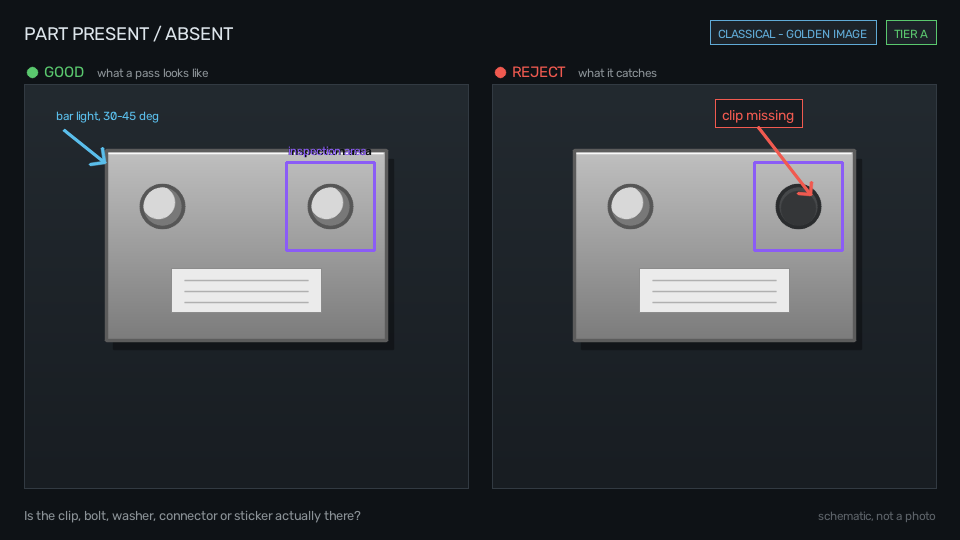
Part present / absent
Golden-image match
It answers
Is the clip, bolt, washer, connector or sticker actually there?
Teach it with
One golden reference
Lighting
Bar light, 30–45°
In the schematic, the reject panel shows a missing clip, its empty socket arrowed.
One library, three engines, twelve applications. Verdict picks the engine from the job, not the other way round — and it is not a safety function: it never sits in an E-stop or a guard chain, and the manual says so in bold.
How it works
From a bare camera to a judging station in an afternoon. No golden sample sent away, no model trained in a cloud — every step happens on the machine in front of you.
- 1
Scan a camera
Point it at a USB webcam, a networked phone, or a folder of frames for a dry run — it lists what it sees and shows the live picture.
- 2
Pick the job
Choose from the library of twelve applications. The engine — template, anomaly or detect — follows from the job, not the other way round.
- 3
Draw the region
Draw the inspection area straight onto your own live frame. No CAD, no golden sample sent away — the reference is the part in front of you.
- 4
Teach with ~40 good parts
Show it good parts. It sets its own threshold, predicts its false-reject rate, and stays in shadow — watching, not rejecting — until it earns the output.
- 5
It judges
The reject pulse leaves on a digital output in milliseconds, before anything is stored — and every verdict lands in the tag store as it goes.
Built on the gateway
This is the part no standalone vision vendor can copy. Verdict rides the same TagStore the gateway serves everything else from, so inspection results are just more tags — not a second system to integrate.
A verdict is not a picture. It is tags.
Verdict is built on the PandaLogix gateway, so every judgement is written into the same in-memory TagStore that every PLC value on the home page lands in. Your SCADA, MES and historian read inspection results over OPC-UA, Modbus, Sparkplug B, SQL or REST exactly the way they read everything else.
No vision vendor's island, no OPC bridge bought separately, no second integration to own. If a plant already runs the gateway, adding Verdict adds twelve tags per station and nothing else to wire.
Read over
One verdict → twelve tags
per station- verdict.resultPASS / FAIL / NG
- verdict.codewhich check decided it
- verdict.scorethe measured value
- verdict.thresholdthe taught limit
- verdict.marginscore against threshold
- verdict.defect_classname, when the detect engine ran
- verdict.roi_idwhich inspection region
- verdict.countinstances found
- verdict.cycle_idthe part or cycle identifier
- verdict.timestampwhen it was judged
- verdict.image_refthe stored frame for this part
- station.stateready · teaching · shadow · armed · fault
The camera you choose
The intelligence is the software, so the camera is a commodity you pick to fit the job. A webcam for presence; a ₹5,000 global-shutter board for defects and gauging. The feasibility calculator inside Verdict tells you which — before you buy anything.
A webcam is enough
presence, assembly, orientation, variant
A USB webcam — or a phone camera over the network — carries the classical checks. If the job is 'is it there and the right way round', you already own the sensor.
A global-shutter board camera
surface defects, gauging, fast lines
Fine defects, measurement, and anything moving want a global-shutter sensor so the frame does not smear. It is a board camera, not a smart camera — the intelligence is the software.
The feasibility calculator answers it first
Before any money moves, the calculator built into Verdict answers the only question that matters: can your feature, at your line speed, be seen by a camera you can afford — and it names the sensor and optics it would take.
It is an estimate, not a guarantee. It tells you whether to reach for the webcam or the global-shutter board — so you buy the right camera once, instead of finding out on the line.
Pricing
Priced like the gateway when it ships: one-time, per station, no tag metering and no annual tax on a station you have already commissioned. The number is not published yet — the shape is.
How it will be priced
- One-time and perpetual — no renewal on a station you have already commissioned
- Priced per station, never by tag count or by verdict
- All three engines and the full library in the price
- The gateway mirror included — a verdict is tags, at no extra licence
We will not put a number on this page before it is one we can stand behind. Ask for a pilot and we will price your station in writing, against your actual part and line speed.
Bring your worst part
A pilot answers the only question that matters before money moves: can your feature be seen, at your line speed, by a camera you can afford. Send us the part that fails today.
Where it stands
The same candour as the rest of the family. Here is what has actually run, and what has not — stated plainly, so you can decide with the real picture.
What has run
- The three engines — template, anomaly and detect — run end to end on a bench.
- The teach → arm → reject loop, with the shadow period and the predicted false-reject rate.
- Camera inputs: a USB webcam, a phone camera over the network, and an image-folder replay.
- The gateway mirror: a verdict published as tags and read back over the gateway's northbound shares.
What has not
- No validated plant deployment. It has run on benches, not on a line, and we will not claim a plant result we do not have.
- No public signed installer. There is a Docker image and a Linux install.sh in the repo; there are no signed Windows or macOS installers, and none are advertised here.
- Camera and optics for defect and gauging jobs are unproven beyond the bench — the feasibility calculator estimates, it does not guarantee.
- Pricing is not published. The shape is settled; the number is not.
Not a safety function
Verdict never sits in an E-stop, a light curtain, or a guard chain. It is a quality and poka-yoke tool that judges parts and pulses a reject — it is not a safety device, it is not rated as one, and the manual says so in bold. Keep it out of anything a person's safety depends on.
Try it
Early access, not a download grid. There is no signed installer to hand out yet — the honest way to evaluate Verdict today is the Docker image, or a pilot on your own part.
Pull the image
For evaluators. The image is on Docker Hub:
docker pull vijenderpanda12/verdict:0.1.1That tag is the x86-64 build. Tags here are per architecture rather than one multi-arch index, so on a Raspberry Pi or a Jetson pull vijenderpanda12/verdict:0.1.1-arm64 instead — the plain tag does not resolve on those boards.
Docker on a Mac has no camera, so on a Mac you evaluate with the image-folder replay — point Verdict at a directory of frames instead of a live device. On Linux, the install.sh in the repo sets it up against a real camera. There are no signed Windows or macOS installers yet, and this page will not pretend otherwise.
Or ask for a pilot
The fastest way to know if Verdict works for you is to put your own worst part in front of a camera. Tell us the feature, the line speed and what fails today, and we will set up a pilot bench and price the station in writing.
If your plant already runs the gateway, the pilot includes the tag mirror — you will read the verdicts in your own SCADA before you commit.
Bring your worst part
A pilot answers the only question that matters before money moves: can your feature be seen, at your line speed, by a camera you can afford. We set up a bench against your actual part and tell you either way.
Verdict is at 0.1.1 and the pilots are how it earns the claims on this page. That cuts both ways, and it is the reason a pilot is cheap and closely supported rather than a procurement exercise.
If your plant already runs the gateway, the pilot includes the tag mirror — you will read the verdicts in your own SCADA before you commit to anything.